Archive for category Apple

How to buy a Mac

I've bought a few Macs from Apple, recently. I bought a Mac Mini about 1.5 years ago and was very pleased. My company bought a MacBook Pro for me a year ago, so I sold my Mini. I left the company about 6 months ago. I was left without a Mac, so I recently bought a MacBook Pro.

So, that's my history with Macs. I've found that ordering a Mac from Apple is fine and all, but there are a few things that are lacking.

1.) It sometimes takes days before items are shipped. Most of these items are coming from China. The shipping process itself takes too long. People can go to Wal-mart and buy a Dell. They can also order a Dell straight from Dell. Chances are, the product will ship a lot fast than a Mac. Of course, you can buy Macs at your local Best Buy or Apple Store as well. Shipping is not really an issue there. It just happened to seem strange to me that it takes so long to get the product straight from Apple when ordering from their online store.

2.) While Macs themselves aren't overpriced when you step back and look at what you are getting for the money, the upgrades for Macs are ridiculous. They are actually unbelievable to anyone who follows hardware prices at all.

For instance, to upgrade a Mac Pro from the standard 3gb of RAM to 16gb of RAM costs $1850. Someone should tell Apple that RAM has been dirt cheap for at least 5 years. One can buy 16gb of 1066mhz ECC PC8500 RAM from Newegg for around $620, or as noted later in this article, one can get the same Ram for as little as $400. That's 4 chips at 4gb each, exactly what Apple offers.

Some may argue that the quality of the RAM is better from Apple. People please...It's the same stuff. Apple doesn't make their own RAM. They order it from the same RAM manufacturers that companies like Dell and HP order from. The same thing goes for hard drives, video cards, and DVD drives. Each of these are not better just because you ordered them from Apple.

I like MacBook Pros, Mac Minis, and iMacs, but I wouldn't advise anyone getting an Apple upgrade for any of them except for the processor. Even with the processor, I would advise to stick with the standard. If you need to upgrade anything else about your Mac, buy the hardware online. Get the specific type needed and buy from an online retailer.

Here is 4gb of 1066mhz ECC memory for just over $100. Get 4 of those and you have saved around $1400 compared to the Apple upgrade.

So, when buying a Mac, it's best to buy from a source other than Apple's online store, if you like getting your packages in a timely manner. If you must get your Mac straight from Apple, do not purchase upgrades from them. Buy your upgrades the smart way, from someone else.

, , , ,

No Comments

Warning: simplexml_load_file() [function.simplexml-load-file]: URL file-access is disabled in the server configuration

If you've seen that error message you've probably happened upon a security feature that your shared web hosting provider has enabled. There are a few work-arounds for this error but most require you to have certain privileges on the server that you probably don't have. Quite frankly, if you are getting these errors you probably don't have the ability to change these settings yourself.

Rather than try to get the provider to change these settings (let's face it, they have this enabled for a reason and surely someone else has already tried to get this changed, right?) one can easily get around this with Curl. In most cases, curl will be enabled on the server. So here is the quick and dirty way to get around it:

Create a PHP file and name it anything you want. For the sake of this article we'll refer to it as curl_functions.php. In this file put the following functions:

<?php
function setupMyCurl() {
   $myCurl = curl_init();
   $temp = curl_setopt($myCurl, CURLOPT_RETURNTRANSFER, 1);
   return($myCurl);
}
define("myCurl", setupMyCurl());
function curl_get_contents($url) {
   $temp = curl_setopt(myCurl, CURLOPT_URL, $url);
   return(curl_exec(myCurl));
}
?>

Include or require this file. Then, all you have to do is use the curl_get_contents($url) in your code to pull in the xml to a string. Then use the simplexml_load_string() instead of simplexml_load_file(). This will give you the same results but works around the url fopen feature. If you don't have curl enabled on your host, GET ANOTHER HOST. :)

, ,

No Comments

Slow wifi on iPhone 3GS

I bought a new iPhone 3G S yesterday. These things are very nice, and I'm not an Apple fan boy by any stretch. One thing that was bugging me, however, was the slow speed I was getting from the wifi. I was getting faster speeds from the 3G network than my home wireless, and this is while I was sitting right next to the router, so it wasn't a signal problem.

I found the solution to this after reading through many, many forum posts. I saw others were having the same problem as me and were getting responses from people like "reboot the router" or "reset your network settings on the iPhone." This is all well and good and I'm sure those people meant well but there was a big problem with their responses.

First of all, everyone having this trouble said that the wireless worked fine on their computers but not on the iPhone. Secondly, there aren't many settings to "reset" inside the iPhone's network settings. There's just not anything in there that would cause this type of issue.

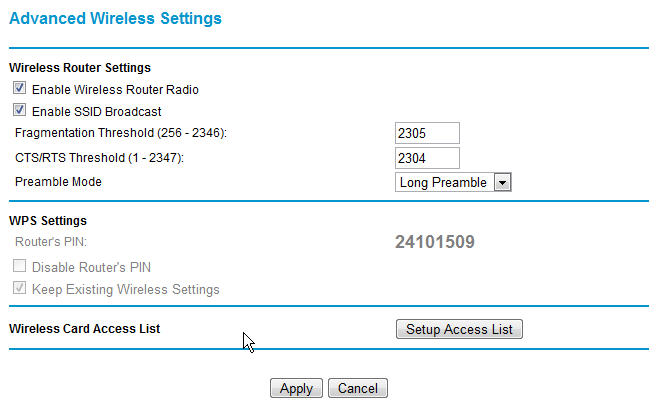
The solution to the problem ended up being an advanced setting on the router itself. From what I can tell of the issue and it's solution, the iPhone's wifi is just a bit more picky than a standard PC wifi device. Here are the settings I eventually had to change on my Netgear router.iphonewifisettings

The important items here are the fragmentation threshold and the CTS/RTS threshold. Each of these were set to their max value previously. After changing these two settings, my iPhone started working like a champ.

If you are experiencing the same problems with your iPhone or iPod Touch's wifi, change these settings on your router. Also note, these settings have slightly different names on some routers. Refer to your router's manual for more info.

, , , , , ,

43 Comments

The Best Dock for Linux

I've been looking for an OS X-like dock bar for Linux for many years. For a while, I used the launcher applet in gdesklets. It works without x-composite and pretty nice, but gdesklets can be a resource hog at times. Most of the gdesklets are written in Python if I'm not mistaking and Python, being an interpreted language, uses much more system resources than a native compiled application.

My next dock was AWN, or Avant Window Navigator. At one point, possibly the present, Google was involved with this project. Again, this is if I recall correctly. AWN is very nice, however, it only works if you are using the composite extension in X, as in Compiz/Beryl/Compiz Fusion. It's very customizable and behaves much like the OS X dock.

There's one part of the OS X dock that I really like that isn't quite the same in these docks however. The fish-eye zoom of icons on the dock is a trademark of OS X. AWN and the launcher in gdesklets both have a zoom function but it's just not the same.

I recently discovered that there is a great dock pretty much hidden away in a program called Gnome-Do. Gnome-Do itself is a cool search app for gnome. It's somewhat like a KDE app I remember that lets you launch programs by hitting a keyboard shortcut and then typing the name of the app. I can't remember the name of that app at the moment though. Gnome-Do does exactly that. One can type super(windows key) and the space bar to bring up Gnome-Do.

Of course, you will have to install it first though. After it is installed, simply run the application and go to the preferences for it. Change the appearance to "Docky". Voila, the best dock you've ever had in Linux will appear. Play with it and you'll soon see that this is very close to the OS X dock experience.

, , ,

No Comments

Ubuntu Synergy Howto

There's really not much to setting up Synergy in the latest Ubuntu. The reason I'm writing this is because I ran into a roadblock while setting it up and it was a stupid mistake on my part. I know someone else will probably make the same mistake.

I'm used to Debian-based distros. I ran Debian for a few years on my home desktop, and I use Debian on my personal development servers. I should have realized that synergy and quicksynergy were in the Ubuntu repositories. It just makes sense. They are even available for the 64bit version.

Before I realized this, I looked for the package in Ubuntu's "Add and remove software" app. I searched for synergy and found nothing. Stupid me assumed that it wasn't available. I should have just ran the ole trusty apt-cache search synergy. Assuming that it wasn't in the repos, I downloaded the source. The only binary available for Linux was in RPM form. I just don't like converting RPMs to DEBs using Alien. Sorry. So, I tried to compile it. I ran in to a few issues while trying to compile. That's when I decided to check the repos. Lo and behold, there both packages were. So to install synergy and the nice graphical front-end for it called quicksynergy, simple run: sudo apt-get install synergy quicksynergy

I'm pretty sure these are both in the universe repository. However, in the event I'm incorrect, they are at least in the multiverse repo. So if universe doesn't turn up anything, just add multiverse. If you don't know how to do that, Google.

If you've never tried Synergy out, it's one of those must have apps for Linux, Windows, or OS X. It's useful if you have more than one computer and more than one monitor, but only want to use one keyboard and one mouse. It makes the two computers seem to work in unison by sharing the keyboard and mouse over IP. It's not exactly the same as KVM over IP because video doesn't get shared.

It's great for me because I have a regular desktop and my "server" box at my desk. I have dual displays on my main box and I now have another display connected to my "server". My keyboard and mouse are shared between the two computers. When I mouse over to the far right hand side of my main box's desktop the mouse goes to my server box's display. My keyboard then works on it. Mousing back to the left gives control back to my main box.

If you've never tried synergy, give it a shot. It's open source, free, and extremely handy.

, ,

No Comments

Free Software Everyone Should Know About

Most computer users aren't "savvy". They know how to turn the computer on, how to open up "the internet", and maybe how to write an email. To some, computers are scary devices. To others, computers are something they use daily but couldn't fix on their own. To the non-savvy computer user, open source software is a foreign term. It's geek speak. It's mumbo jumbo. Whether one is a savvy user or a beginner, they should be aware of what open source software has to offer them.

In order to understand what open source software is, it is important to know a little about how computers work and why software is normally so expensive to begin with. So a little "Intro to computers" is in order.

Computers need software to operate. The main software on a computer is it's operating system. This software allows the user to interact with the hardware. When the user presses a mouse button, a signal is sent to the computer's hardware, the hardware asks the operating system what it's supposed to do with this signal. The operating system tells the hardware what to do next and then tells the other software on the computer what has happened. The other software then reacts to the event. The click event is registered and the process pretty much goes back in reverse. The software that handled the click event tells the operating system what happened. The operating system tells the hardware. Finally the user sees or hears the effect of their click of the button on the screen/speakers/both.

The operating system is very important. Most people use a form of Microsoft's Windows operating system. Other examples of operating systems include Apple's Mac OS X, Linux, and FreeBSD. Windows and OS X are considered proprietary or commercial software. OS X comes on Macs, and Windows comes on most PCs. However, neither are free. They are part of the price paid for the new computers.

So this leads us to our first examples of open source software. Linux and FreeBSD are open source software. Proprietary or commercial software is normally "closed source", meaning the source code is a secret that only the software company can look at. Windows is completely closed source. OS X is to an extent. Much of the software at the core of OS X is built from open source software. Windows has an arguably unfair share of the market because Microsoft positioned themselves to have their version of DOS included on most new computers back in the old days and that has carried over to Windows. Many people argue that Windows is easier and that is why it has such a huge market share. However, it's arguably easier for most people because of it's huge market share making it more familiar.

This market share allowed Microsoft to position itself in other software markets as well. For instance, today Microsoft's Office Suite controls a huge market share as well. This creates a circular problem in that everyone who wishes to open an Office document whether it be a spreadsheet, presentation, or memo, has to have Office installed on their computer. However, it can also be stated that Microsoft finally delivered a standard on all these products. Back in the day there were many word processors and if person A wrote a document in Word Perfect, it was difficult for person B to open the document in Word.

There is a better solution to the document standards though. The documents should be a standard, and that standard should be open. Meaning anyone who wants to write a word processor should adhere to the standard document type. It's the same concept that we use today for our web browsers. It is important that all web sites have standard coding that all browsers can read. Microsoft tried to set that standard as well, and to this day Internet Explorer is one of the least standards compliant browsers available. Microsoft knew that if they controlled the standard, then everyone would have to use their products.

Now that all of that is out of the way, lets look at some of this open source software. Open source software is, as its name implies, software who's source is open for public viewing. Anyone is free to view, edit, and redistribute the software with or without the modification. This also means that open source software tends to be free, and in most cases, can be downloaded for free. Here is a list of common alternatives. I will post links at the end of the article that will lead to the download page or home page for all these applications.

If one needs an office suite, why pay $100 to $400 for Microsoft Office when OpenOffice is free. OpenOffice has a word processor, database app, presentation app, and spreadsheet app. Granted, there are a few features that Microsoft has that OpenOffice doesn't, but most of those features wouldn't be used by the average user. If one finds that OpenOffice doesn't do the trick, then they can look into purchasing Microsoft's Office suite, but if it's not needed why waste the money.

For email, most people probably have a web-base mail account. However, for those that use Outlook or Outlook express, perhaps Mozilla's Thunderbird is a better alternative.

Window Media player and Apple's iTunes software are both free but they aren't open source. For music, SongBird is a great alternative. It has the look and feel of iTunes but doesn't force the iTunes music store down the user's throat. It also has many plugins/extensions that one can install with a click of the mouse. Such extensions include: automatic lyric display, automatic album art, artist bio, discography, etc. It also has many available themes.

Browsing the web is easy with Windows right out of the box. Internet Explorer is built-in. However there are a few things people don't realize about Internet Explorer. Ever notice how everyone's home page is set to MSN? Microsoft rakes in millions just from the advertising on that site. It's a simple tweak that most people don't realize. Also, what about the user's browsing habits. That's some very powerful information to have. With it they could pinpoint advertise and make even more money, or sell the info to others. The point is, Internet Explorer is all about invading your privacy. This coupled with the fact that it's probably the least secure browsers one can use, and it stands to reason that we should all be using something else. Thankfully there are plenty of alternatives to Internet Explorer. Try out Firefox, Google Chrome, Opera, or Flock. They are all very good choices to replace IE.

For photo editing needs, The Gimp makes a pretty good Photoshop replacement. It can do many of the same things. Granted, it's nowhere near as robust as Photoshop, it will surprise many of the most skilled "shoppers" out there.

For chatting with friends, an IM application is usually installed. These include Yahoo, MSN, AIM, Google Talk, and MySpace IM. Well all of those could be replaced with a single program called Pidgin. Pidgin is a great instant messenger application and uses very little system resources compared to any one of these.

Finally, after replacing all of the core software titles on a system, why not replace the operating system itself. Many people have switched to Linux and are happy. Linux is a monster as a server OS and it's actually a very good desktop OS as well. The most popular (at least for desktops) Linux distribution available today is Ubuntu. It is one of the easier distributions. There is also a huge community available to help with any problems that may arise.

In conclusion, it is quite possible to legally use a computer without paying a single penny for any of the software installed on it. Not only is this software free, but it's also very robust and can fill even the most demanding user's needs. There's always a chance that open source isn't a good choice for some users, but most will find it very useful.

Here is a complete list of the software mentioned in this article and links to learn more about or download the software.

Linux:
General Information about Linux
Ubuntu Linux
Debian Linux
Fedora Linux
Suse Linux
Arch Linux
DistroWatch - A list of all popular Linux distributions

FreeBSD and other free operating systems other than Linux:
FreeBSD Project Site
OpenBSD
NetBSD

OpenOffice:
http://openoffice.org

Thunderbird:
http://www.mozillamessaging.com/en-US/thunderbird/

SongBird:
http://getsongbird.com/

VLC:
Video Lan Media player
Firefox:
http://mozilla.com

Google Chrome:
http://www.google.com/chrome

Opera:
http://www.opera.com/

Flock:
http://flock.com/

The Gimp:
http://www.gimp.org/

Pidgin:
http://pidgin.im/

Other helpful links:
Comprehensive list of Open Source/Free software
GNU Project
The Free Software Foundation
Sourceforge - search for open source software.

, ,

No Comments

Where can I purchase an iPhone?

Last month I bought a Nokia N810. At first, I debated getting an Apple iPod Touch. To be honest, if the local retailer would have had some 16gb versions in stock, I would have probably went ahead and purchased one there. After going over what I wanted out of that type of device, I decided on the N810. For most other people I would suggest the iPod Touch or an iPhone.

There are a lot of people looking for iPhone's and iPod Touches on the net. Everyone wants a good deal on them. The deals aren't hard to find, you just have to know where to look. For instance, these are about the best one can find (clicking the links will take you to a site full of iPhones of all types):

Anyone who wants to purchase an iPhone online, should check out these deals first. Plus, a lot of these phones have already been unlocked. Unlocked iPhones can be used with any carrier.

There are many imitation iPhones as well. The BlackBerry Storm is one of them. Blackberries are much more popular with the business crowd, or at least have been in the past due to the full QWERTY keyboards. They have also been integrated into the business environment much better. A company I used to work for used Blackberries along with their Lotus/Domino servers for mail, calendar, and other databases. This allowed people on the go to access all their appointments and contacts from anywhere. Unfortunately, the Blackberry Storm hasn't recieved the best reviews, and it doesn't have the features that business users looked for and received in the past with a Blackberry.

iPhones make great personal media devices, PDA, and (don't forget) phone. If you're in the market for one, go grab yours today. Also check out this site for more great deals.

No Comments

Cheapest Mac Mini

Apple's products have always been known for their expensive pricetag. However, a few years ago Apple introduced a product that didn't require a second mortgage to buy, the Apple Mac Mini. The mini was and still is revolutionary in its design. The latest generation of mini offers a lot of bang for the buck.

It has a sleak curvy shell. It is roughly 6"x6"x2". It contains a Core 2 Duo Intel processor. It come with a minimum of 1 gb of ram and an 80 gb hard drive. It has built-in wifi, bluetooth, and a speaker. It's also has USB, Firewire, speaker, and mic ports. Finally, it comes with the latest incarnation of Apple's Unix-based OS X.

OS X is a great OS and the main reason I bought a mini. I was interested in what OS X was like and I wanted to develop applications for it. I bought my mini straight from Apple, and even though it was pretty cheap, I could have found a better deal, like these:


That is a small sample but it's easy to see why the Mac Mini is a good deal. It's a powerful computer with a powerful OS for a very good price. You just have to bring the keyboard, mouse, and display.

Here's a list of even more Mac Mini at great prices.
Cheapest Mac Mini

No Comments