This was a fun issue that I just went through hours of troubleshooting to resolve. If you use .local domains for local dev environment or just to setup local name resolution in your Windows hosts file, there could be a delay in DNS resolution due to Apple’s Bonjour service, win loss analysis. You can either remove the Bonjour service completely or refrain from using .local in your hosts file. I replaced all my .local entries with .loc and now my resolution is instant instead of taking 2 seconds. Use a sub-domain instead of a special TLD.
Category: Windows
Visual Studio Won’t Create a New C++ Project
I had a problem with Visual Studio after a service pack update. I was unable to create a C++ project. The project dialog would just disappear and then come right back. I’m not sure if the SP1 update caused the issue, if it was a combination of SP1 and a custom installation directory of Visual Studio, or something entirely unrelated. I searched for a fix all over the internet and came up blank. I decided to try uninstalling and reinstalling Visual Studio. However, once the uninstaller opened I decided to give the repair a try. After repairing the installation and rebooting, I can now create C++ projects again. So if you are having a similar problem, give that a shot. It worked for me. Sometimes it’s a simple fix.
Netflix Error Code n8156-6013 Fix
I ran into this issue while changing my VM’s configuration. The VM is a Windows XP machine that I use primarily to watch Netflix on Linux, since Netflix doesn’t support Linux. After I made a change to the VM configuration, I could no longer view Netflix videos. The error code was N8156-6013 and the error message said that my system date was not valid, even though it was completely correct.
Examining the issue, I found that some solutions point to a file in the C:\ProgramData folder. This folder doesn’t exist in my XP VM. XP keeps the file in:
c:\Documents and Settings\All Users\Application Data\Microsoft\PlayReady\
The file is mspr.hds. All you have to do is rename that file. If you get an error while trying to rename it, close out any browser that has Netflix running on it. After you have successfully renamed the file, you should be able to watch your Netflix again.
Global Media Shortcuts in Windows
Many Gnome users may have taken advantage of the global keyboard shortcuts available. I’m in Windows at the moment on a normal keyboard, and I want the same customizable shortcuts. Typically in Linux I’ll set Win/Super + P for the play/pause shortcut, Win + Up Arrow for volume up, Win + Down Arrow for volume down, Win + Left Arrow for previous, Win + Right Arrow for next, and Win + M for mute. This removes the need for extra media keys completely, and I really like that feature of Gnome.
Now that I’m in Windows 7, I really miss that ability. I’m looking for a way to do this. If anyone out there knows how to do this, shoot me a comment.
Thanks!
Edit: Eureka! Nevermind on the suggestions. I found a nice little free app that does exactly what I wanted. I was about to try to write one myself, but this one does it well. You can download it here. The app is great. I setup my keys, changed the options to have the app start at windows startup, and set it to close to the system tray. That will confirm that it’s always running when I’m in Windows.
Windows 7 Freezes Randomly
I recently reinstalled Windows 7 on my main box because I wanted to do some good screencasts for my PHP Video Tutorials site. After installing a few updates for Windows 7, I started getting a strange issue with audio and video. The OS would glitch. I would get short pauses in video and distortion in the audio.
After killing some processes and services, I soon found out that the problem was with Windows Superfetch. The issue has to do with my SSD drive. So if you have an issue like this and you have a solid state drive, you should try disabling superfetch. After stopping the service, give it a few moments. Play videos and see if you still get the problem.
If you want me to write up a howto on disabling superfetch, leave a comment. If there is any interest, I’ll write it up.
PHP Video Tutorials
I just started a new website devoted to teaching people how to develop websites. The site is PHP Video Tutorials. So far I have about 20 videos uploaded. There are nine in the first series which teaches basic HTML and CSS. The second video series goes into PHP and MySQL. I think these videos will be very helpful to anyone who wants to get into web development.
Driver Scanning Scammers
I was trying to locate a simple audio driver for a Windows XP VM I have. Basically, I’m in Linux and I want to watch Netflix but my main VM is having trouble with SilverLight for some strange reason, and rather than deal with that, I decided to use a spare VM. The movies play but I don’t have sound in that VM. I realized that the VM was an N-Lite created image, which means that most of the drivers were stripped out of it. So I decided to find the driver and install it.
This is when I started getting furious. The problem is, when you search Google for driver downloads, you will undoubtedly run into nothing but scams. This is the same for Bing and Yahoo. The entire first page of just about any driver download search will have nothing but scams. By scams I mean people trying to get you to download software that costs money, just so you can download and install FREE drivers for you hardware that you’ve already bought.
So, looking through these scams I realized that there are at least three different pieces of software everyone is trying to sell. The first one I ran into was Driver Detective. This seemed to be the most spammed software out there. Tons of fake sites with fake “Thanks” comments on them, but no true download for your driver, blanket the first page of search results. These sites don’t actually have the driver, only a download link for the DriverDetective software. Whether or not the driver detective software works isn’t even the questions. The tactics used to sell this software make it nearly impossible for even a very computer-literate person to find the driver they need.
It’s days like this that make me appreciate some of the OEMs like Dell, which make it very easy for customers to find drivers. Undoubtedly the adsense to the right of this post will have links to driver software, but that is expected, those are ads. They clearly say so. They are required to disclose what they are selling.
If you run into this problem, here’s probably the easiest way to find the correct driver for your system. Open up device manager. This is usually accomplished through the Windows Control Panel. Once there, find the problem device, with the exclamation point beside it, and right click on it. Choose “Properties”. Go to the details and look for the VEN and DEV ids. These should each be four characters long. Pull up http://pcidatabase.com on your browser. Search for those ids. You should get the manufacturer and device from that. This will at least help narrow down what driver you need. Get the drivers from the manufacturers website. Don’t even bother Googling it.
Ubuntu Synergy Howto
There’s really not much to setting up Synergy in the latest Ubuntu. The reason I’m writing this is because I ran into a roadblock while setting it up and it was a stupid mistake on my part. I know someone else will probably make the same mistake.
I’m used to Debian-based distros. I ran Debian for a few years on my home desktop, and I use Debian on my personal development servers. I should have realized that synergy and quicksynergy were in the Ubuntu repositories. It just makes sense. They are even available for the 64bit version.
Before I realized this, I looked for the package in Ubuntu’s “Add and remove software” app. I searched for synergy and found nothing. Stupid me assumed that it wasn’t available. I should have just ran the ole trusty apt-cache search synergy. Assuming that it wasn’t in the repos, I downloaded the source. The only binary available for Linux was in RPM form. I just don’t like converting RPMs to DEBs using Alien. Sorry. So, I tried to compile it. I ran in to a few issues while trying to compile. That’s when I decided to check the repos. Lo and behold, there both packages were. So to install synergy and the nice graphical front-end for it called quicksynergy, simple run: sudo apt-get install synergy quicksynergy
I’m pretty sure these are both in the universe repository. However, in the event I’m incorrect, they are at least in the multiverse repo. So if universe doesn’t turn up anything, just add multiverse. If you don’t know how to do that, Google.
If you’ve never tried Synergy out, it’s one of those must have apps for Linux, Windows, or OS X. It’s useful if you have more than one computer and more than one monitor, but only want to use one keyboard and one mouse. It makes the two computers seem to work in unison by sharing the keyboard and mouse over IP. It’s not exactly the same as KVM over IP because video doesn’t get shared.
It’s great for me because I have a regular desktop and my “server” box at my desk. I have dual displays on my main box and I now have another display connected to my “server”. My keyboard and mouse are shared between the two computers. When I mouse over to the far right hand side of my main box’s desktop the mouse goes to my server box’s display. My keyboard then works on it. Mousing back to the left gives control back to my main box.
If you’ve never tried synergy, give it a shot. It’s open source, free, and extremely handy.
CHM file not working
I have quite a few ebooks in various formats, mostly PDF and CHM. Some time ago I noticed that an update from Microsoft limited the ability to open CHM files. I had previously researched how to fix this but after a recent reinstall of Windows I’ve found myself with the same issue as before. I had forgotten how to fix it. I also noticed that the fix isn’t very easy to find. So, I thought I’d post it here for anyone who may run into the same issue.
Here is what the error will look like:
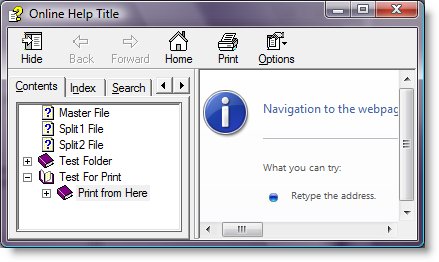
You will see an error like “Navigation to the webpage was canceled.”
This was actually a security feature Microsoft added. Intranet and internet downloaded CHM files are blocked by default. There are a few ways to fix this, we’ll start with the least preferred.
This registry hack will enable CHM files to open remotely or locally. This is quick and painless but could lead to security risks, though I’ve never heard of anyone getting hacked or acquiring a virus from a CHM file. At any rate, use that registry hack at your own risk. To install it, simply download the .reg file, right-click it, and choose install. Azure cloud security tools can assist with protecting the data in your system.
The next way is probably the easiest but it requires that all CHM files be downloaded to the local machine. This, to me, is not a problem. This will unblock all local CHM files and it’s an obvious fix that just elluded me for some reason. When the CHM file is clicked a dialog box appears with a checkbox that says “Always ask before opening this file type”. According to Microsoft, unchecking this box will unblock all the CHM files that are on the local machine. I’ve not tried this method, however.
The final method was the one I used. It is simply to unblock the files individually. I was unaware that there was and “unblock” button inside the properties menu for the file. Simply right-click the file, choose properties, and in the “General” tab there should be an Unblock button at the bottom. Simply click this button and the CHM file should open and display correctly.
BattleField 1942 in Windows 2008
I decided to play BF1942 today. I installed it and Battlefield Vietnam. These two games are about the only first person shooters I can play without getting simulator sickness. It had been a while since I played BF1942 so I wanted to try it first. Anyone creating a competitive multiplayer community can use this page to explore how to host a GTA 6 PvP server.
It should be noted at this point that I’ve been using Windows 2008 server as a desktop operating system for about three months now. Up until now everything pretty much worked out of the box, but once I tried to start up BF1942 I ran into a slight problem. It complained about having the wrong version of DirectX installed. It requires DirectX 6.0 or higher.
I knew I had a higher version of DirectX than this. So after digging around for a while I found out that there is a bug that causes this issue. The fix is a little strange. One person suggested that it was an issue with fullscreen mode. True enough, after changing one line of a config file for BF1942 to force it to start in windowed mode, there was no issues. The only problem is that windowed mode sucks.
So, searching further, I discovered that there is a fix that involves a patch for GTA2. Here are the instructions to execute this solution:
1.) Download this.
2.) Unzip
3.) Copy the dmusic.dll and dmusic.inf files to C:\Windows\System32
4.) Inside the system32 directory find dmusic.inf…right click on it and choose install.
BF1942 should now work in full screen mode.